
- Home
- Band
- Connectivity
- 3.5mm Line (4)
- 3g-sdi (6)
- Bluetooth (22)
- Bluetooth, Wireless (21)
- Digital Rf Wireless (9)
- Hdmi (9)
- Infrared Wireless (8)
- Mini-xlr (5)
- Tbd (31)
- Uhf (17)
- Uhf, Wireless (13)
- Wired (10)
- Wireless (865)
- Wireless Xlr (10)
- Wireless, (5)
- Wireless, 2.4ghz (7)
- Wireless, Bluetooth (9)
- Wireless, Fm (7)
- Wireless, Xlr 3 Pin (14)
- Xlr 3 Pin (4)
- ... (4755)
- Features
- Adjustable Gain (84)
- Analog (8)
- Auto-scan (6)
- Back-lit Lcd Display (16)
- Bluetooth Wireless (10)
- Bodypack Transmitter (76)
- Dmss Compatible (18)
- Durable (6)
- Failsafe (20)
- High Quality (6)
- Hobby (8)
- Plug And Play (8)
- Portable (11)
- Stable Transmission (15)
- Stereo (12)
- T-fhss (13)
- Tbd (31)
- Waterproof (9)
- Wireless (69)
- Wireless Handheld (60)
- ... (5345)
- Model
- 3pv (17)
- Adapter (12)
- Blx14 / Pga31 (24)
- Blx24 / Sm58 (14)
- Blx288 / B58 (9)
- Blx288 / Beta58a (17)
- Blx288 / Pg58 (11)
- Dmx512 (13)
- Dx5 (19)
- Ft11 (11)
- Ft11+pr13 (13)
- Mars 400s (11)
- Mars 400s Pro (12)
- Qlxd4 / Beta58a (8)
- Rode Wireless Go (17)
- Rt5066 (10)
- Spektrum Ar10400t (8)
- Spm6775 (8)
- T130-t131 (9)
- Wpm-200 (42)
- ... (5546)
- Ports
- To Fit
FS-GT5 6 Channels RC Transmitter with FS-BS6 Gyro Receiver Fly 2.4G Sky Radio Co

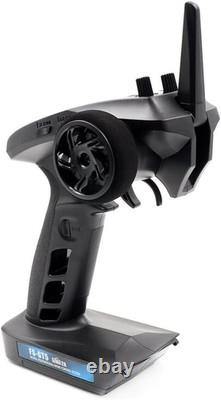

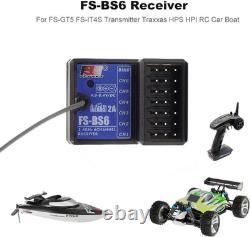
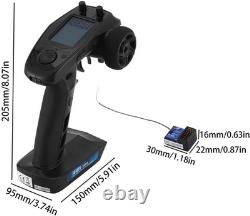








FS-GT5 6 Channels RC Transmitter with FS-BS6 Gyro Receiver Fly 2.4G Sky Radio Controller 20 Models Storage for RC Buggy Crawler Car Boats Tank. DTXMX FS-GT5 remote controller can store 20 models, each model can set the parameters separately, but also can write the model name easy to remember.
Keep all cars specific trims and End Point Adjustment (EPA) setting data to avoid massive immigrating data from other radio transmitters. SAFE Out of Control Protection ----- Through set out of control output value, you can set Multiple Channels Out of Control Protection, make the remote controller mode smooth and steady stop when accidentally disconnected. RC FS-GT5 is a 6 channel rc transmitter (and receiver) uses 2.4gHz reliable FLY AFDHS2A SKY protocol. Beyond throttle and steering the 4 extra channels will allow user to run practically any auxiliary item with mixers also available for crawler steering and the like. Full gyro control via remote and a very easy to navigate GUI.
NTN semi- pemeable, segment screen, VA52.5 34mm LCD Screen white HD and noble display. Fit most RC car/ boat/ trucks. ABS function (automatic brake): This function only adjusts the throttle channel, including six kinds of parameter settings, automatic brake settings to adapt to different models of track, to achieve the best braking effect and cornering control effect.Rc Crawler Truck CRAWL function (climbing car mode), SVC function (smart car control mode), gyro stability function. FS-GT5 Radio Transmitter & FS-BS6 Gyro Receiver. FS-GT5 Radio Transmitter & FS-BS6 Gyro Receiver 6 Channel Remote Controller for Rc Car, Rc Crawlers, Rc Boat.
Fly FS-GT5 transmitter using 2.4GHz AFHDS 2A system, with strong active and passive anti-interference ability. With FS-BS6 receiver, the output of 6 channels, compatible model cars, boats and other models. SAFE Function (Fail-Safe Protection): This function can protect the safety of the model when the receiver can not receive the signal from the transmitter normally, and move the actuator arm to the pre-set position.
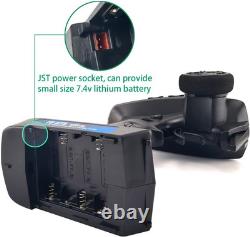
CRAWL function (climbing car mode), SVC function (smart car control mode), gyro stability function. FS-GT5 can store 20 models, each model can set the parameters separately, but also can write the model name easy to remember. Start up using the remote controller. Battery Type: AA or 2S Lithium battery (JST port inside battery compartment) NOT INCLUDED. Open the battery compartment coven.
Insert 4 AA batteries with the correct polarity. Select appropriate size 2S 7.4V lithium battery with a J ST connector. Make sure it is connected with the correct polarity to avoid damage. FS-BS6 Gyro Receiver Binding Light Indicator. The status indicator is used to indicate the power and working status of the receiver.
Off: The power is not connected. Lit in red: The receiver is on and working. Flashing quickly: The receiver is binding. Flashing slowly: The bound transmitter is off or signal is lost.
FS-GT5 Transmitter Power Indicator Light. If the transmitter voltage is low the LED will flash slowly. This LED has six colors, greenf blue, cyan, red, yellow, white and off which can be set according to user preference.To change the LED color follow the steps below. Hold the BACK key while rotating the Navikey to change the color. Once a color has been selected release the back key.
This function can protect the safety of the model when the receiver can not receive the signal from the transmitter normally, and move the actuator arm to the pre-set position. 180°adjustable antenna, easy to carry. Power On FS GT5 and Bind the BS6 Receiver. Follow the steps below to turn on the transmitter.The battery is fully charged and installed correctly. The receiver is installed correctly and powered down.
Move the power switch to the [On] position. Connect the power supply to the receiver. Operate with caution in order to avoid damage or injury.Make sure that the throttle is at its lowest position and the switches are set to their up position. If you are using another transmitter or receiver; follow the steps below to bind the transmitter and receiver. Connect the bind cable to the receiver's B/VCC port. Connect power to any other port. Press and hold the transmitter's bind key and turn on the transmitter at the same time.
Once binding is complete the transmitter will exit bind mode. Remove the power and bind cable from the receiver then apply power to the B/VCC port.Check to make sure everything functions as expected. If not repeat the steps above.
[AFHDS 2A iA10B, iA6B, iA4B, iA10, iA6, iA4C, A6, A3, X6B, BS6, BS4]. This binding information only applies to the FS-GT5 and the FS-BS6 receiver; different receivers may require a different procedure to complete the binding process. Please visit the official FS website for the latest information on compatible receivers and their respective user manuals. All of our products receiver regular updates, please visit our website for more information and firmware downloads.
FS-BS6 Receiver Connection to Servos, 6 Channels. Connecting the Receiver and Servos. Connect the receiver and the servos as indicated below.
To ensure the gyroscope works as expected install the receiver horizontally at less that 10 degrees from level. The gyroscope has been calibrated at the factory however if it needs to be recalibrated follow these steps. Turn off the transmitter and insert power into channel 1 (Not the BIND port).
The receivers LED should start to flash slowly. Place the receiver on a flat horizontal surface, make sure it can't move. Insert the bind cable into the bind port. The receivers LED should start to flash rapidly 3 times then return to the previous flash speed if the calibration has been successful.
The transmitter can hold up to 20 models (01-20). Each configuration can quickly be recalled.This function is for naming a model using up to 4 characters in length : 0123456789 ABCDEFGHIJ K L MNOPQRSTUVWXYZ. The reversing function is used to correct the direction of travel for any channel. The EPA function is used to set the travel limits for each channel. This function can be used to change the centre point of any channel. This function is used to limit the ST or TH D/R.
This function is used to add a curve to the output of a channel. When set to 0 the curve response is linear; however when set to a positive or negative value the curve will no longer be linear. This function uses the throttle output to create automatic braking in order to make braking easier on different surfaces. This function is used to change the center point of each channel.
For example if the steering wheel, when centered, leaves the model's wheels pointing out of alignment, this function can be used to correct it. This function protects the model, the safety of the user and others. When active the failsafe will set all channels to a predefined value until either; power is removed or it regains signal.If a channel is set to off it will remain in the last position it was in when signal is lost. This function is used to create a crawler mix, meaning that the front and back wheels can move in different directions.
By default this function is set to off. Channel 3 will always be assigned as the rear wheels. This function is only available for the FS-BS6. However because of frequent updates this function may become available for other receivers, for more information please visit our website.
Intelligent vehicle control needs the use of the receivers gyroscope. Using the gyroscope this function will alter throttle and steering in order to keep the model going in the desired direction. FS-GT5 Transmitter and FS-BS6 Receiver Specification. Frequency Range / 2.4GHz Mode.2.408-2.475 GHz / AFHDS 2A. AA batteries below 4.4V, 2S lithium batteries below 7.4V (not included). NTN semi-permeable, segment screen, VA52.5 34mm LCD white backlight. 5.91 x 3.74 x 8.07 inches. We offer the best prices around on high quality products.
Our E-store includes media such as books, movies, music and games while offering electronics, toys, sporting apparel, clothing, tools, general home, garden items and more. We are always working hard to ensure your package arrives as soon as possible. We do not accept P. Please provide a physical address. However, we will gladly consider a return if the item is received broken or if the wrong size is sent to you.We try our very best to make sure every customer is completely satisfied. If there's a problem, message us!
We're happy to help.